
How to create a sports practice plan
AI Parent turns a sports goal into one practical plan with scheduled tasks. You can make a plan for a child, teen, adult, yourself, or another profile and then adjust it to fit the person’s experience, availability, and routine.
Choose a sport
Sports plans can support practice routines, conditioning, skill development, and consistency. Available sports are not limited to:
- basketball, football, soccer, and baseball
- tennis, volleyball, softball, and golf
- swimming, diving, cross country, and gymnastics
- track and field, cheerleading, dance, and other activities
For an unlisted sport or a very specific training goal, use a Custom plan and describe the sport, drills, skill level, schedule, and equipment.
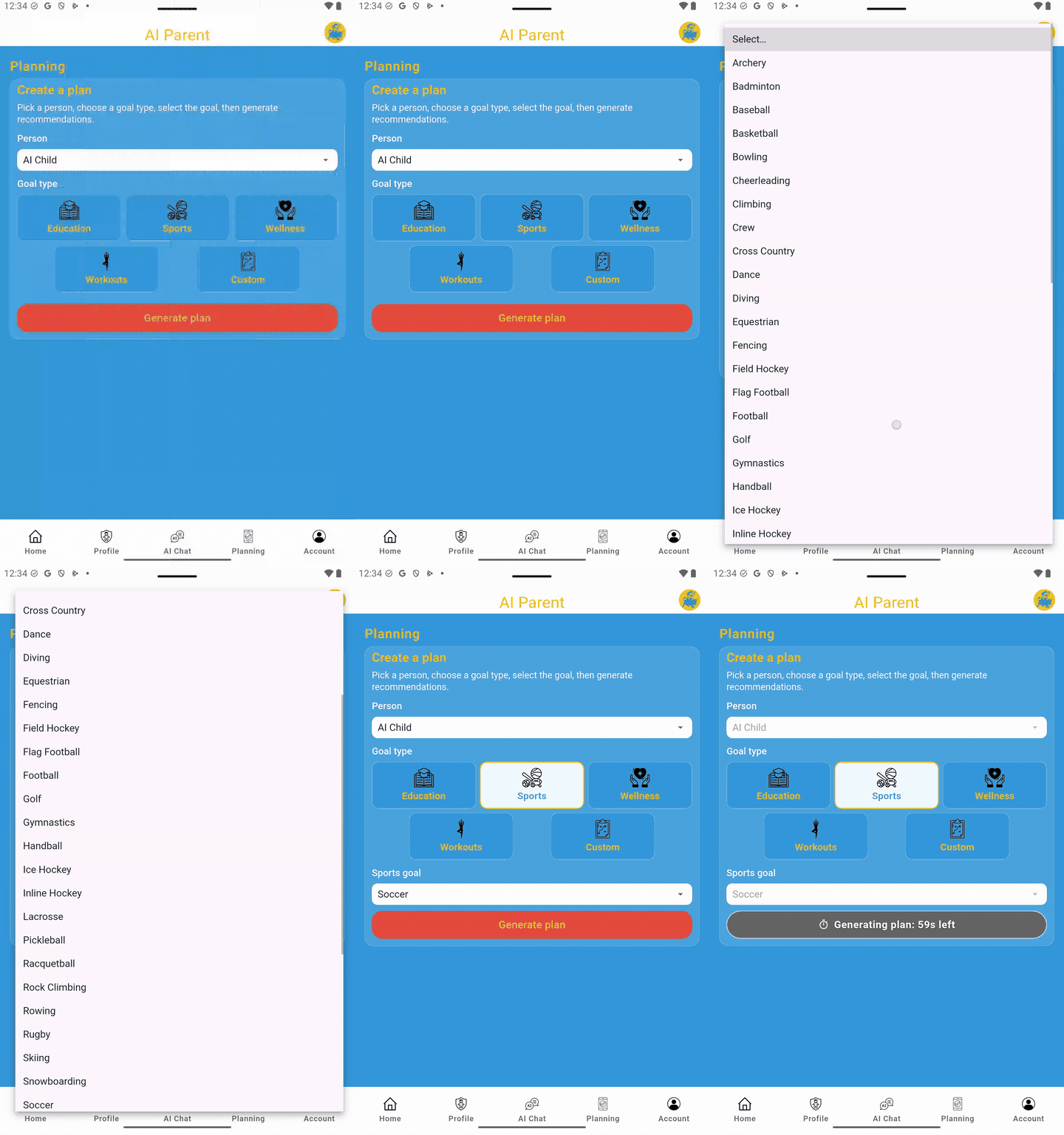
Generate → review → save
- Open the Planning page.
- Select the profile for the person who will follow the plan. If there is only one profile, that person may already be selected.
- Choose Sports.
- Select the sport or sports goal.
- Premium feature: Add useful comments or directions, such as available days, time limits, preferences, skill level, or equipment.
- Tap Generate plan to generate one plan.
- Review the plan summary, tasks, days, times, and duration.
- Tap Save, Regenerate, or Discard.
Tap Regenerate to get a new plan with different tasks for the same profile and the same sports goal selection. Saving connects the plan to the selected profile.
Review and personalize the tasks
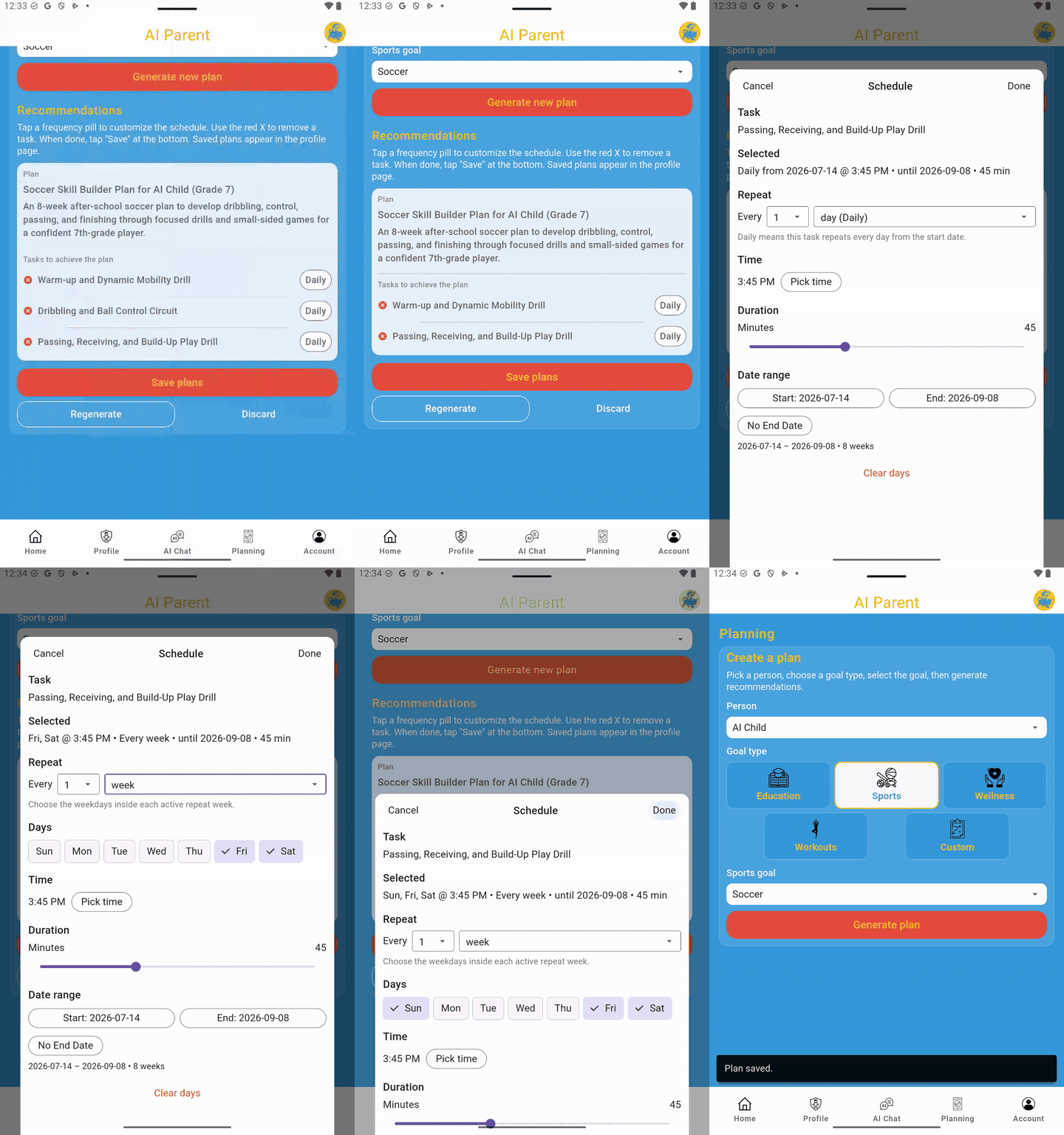
Treat the generated plan as a starting point. Remove tasks that are not useful, unsafe, unavailable, or already covered by a coach or team schedule. In V3.3, you can edit a task title when editing an individual task or the plan.
You can also adjust the repeat pattern, selected days, scheduled time, duration, start date, and end date. Task duration can be adjusted from 5 to 120 minutes so short drills and longer sessions can both fit the plan.
Use the sports plan each day
- Profile page: Find the saved sports plan under the person and open it for later edits.
- Home page: View sports tasks that are due today and mark them complete.
- Calendar: Use Day or Week view to review scheduled practice tasks by date.
Pro tip: Tasks for the selected day are listed by scheduled time in Calendar and may be marked complete from that view.
Set a realistic practice schedule
The right schedule depends on the person’s age, experience, existing team practices, recovery needs, and available time. Start with a routine that can be followed consistently.
- Practice frequency: commonly 2–5 days per week, depending on the sport and existing commitments
- Session length: often 15–90 minutes, with shorter sessions for beginners or busy days
A simple practice structure
- Warmup (5–10 minutes)
- Skill drills (10–30 minutes)
- Game-like practice (10–30 minutes)
- Cooldown (3–10 minutes)
Practice safely
- Use a safe location and appropriate equipment.
- Follow coaching, facility, team, and sport-specific safety rules.
- Use age-appropriate drills and avoid adding intensity too quickly.
- Stop a task when there is pain, dizziness, unsafe weather, damaged equipment, or another safety concern.
Best practices
- Be specific. Include the position, skill, drill, available space, equipment, and time limit when those details matter.
- Keep it manageable. Consistent practice is usually more useful than an overly demanding schedule.
- Update the plan. Edit task titles or schedules when school, work, team practice, seasons, or goals change.
- Use Custom for special goals. Custom plans work well for unlisted sports, off-season routines, tryout preparation, or highly specific drills.